
Digital hole-by-hole scorecards are the right call for almost any tournament that wants live standings without babysitting a spreadsheet. They let players or volunteers enter scores from a phone, push instant leaderboard updates, and cost a fraction of what a subscription platform charges for the same job. For small clubs and fundraisers running one or two events a year, a mobile-friendly, pay-per-player tool handles the job without a setup headache.
TL;DR:
- Digital scorecards update scores instantly, reducing the time spent on manual calculations and post-round disputes, saving hours of volunteer effort.
- Setting up live scoring requires straightforward steps like tournament configuration, player registration, and device assignment, with a verification process to prevent errors.
- Preparedness involves charging devices, testing connectivity, printing backup scorecards, and briefing volunteers on scoring procedures and dispute handling.
- Offline capabilities are crucial on courses with poor signal, and fallback procedures, such as collecting paper scorecards, ensure reliable results.
- Platforms with transparent, per-player pricing and easy format customization are best suited for one-off events, avoiding costly subscriptions and ensuring flexibility.
Table of Contents
- Why Digital Scorecards Beat Paper for Tournament Scoring and Fundraising
- How Hole-by-Hole Live Scoring Actually Works
- Tournament-Day Master Checklist for Live Scoring
- How to Choose a Digital Scorecard Solution
- Integration With GPS and Shot Tracking Features
- Data Privacy and Security for Player Information
- Comparing Popular Digital Golf Scorecard Platforms
- Offline Capabilities and Data Syncing on the Course
- Customizing Scorecards for Different Event Types
- Analytics and Reporting After the Round
- Organizer Perspective: 5 Tactical Takeaways
- Chase Birdies: A Simple, Pay-Per-Player Way to Run Live Scoring
- Sources
Why Digital Scorecards Beat Paper for Tournament Scoring and Fundraising
Paper scorecards work fine for a casual Saturday round. They fall apart the moment you're running a shotgun start with 30 foursomes and a banquet room full of people waiting for results. Someone has to collect every card, re-add the numbers, catch the math errors, and figure out who actually won the second flight. That process eats an hour or more of volunteer time you don't have.
Digital scorecards for golf tournaments solve this by pushing scores to a leaderboard the second they're entered. Instead of a runner walking cards to a scoring table, a player or marker taps in strokes hole by hole, and the standings update on their own.
The payoff shows up in a few concrete ways:
- Faster awards ceremonies. Instant leaderboard updates mean you know the winners before the last group finishes eating, not 45 minutes later.
- Higher engagement. Golfers check the leaderboard on their phones between holes, which keeps interest high during a long shotgun format. Live scoring measurably increases participant engagement and opens new digital sponsorship inventory through leaderboard placements.
- Fewer scoring disputes. Editable, timestamped entries make it easier to catch and correct a mistyped score before it becomes an argument at the podium.
- Less volunteer burnout. Centralizing data on one platform means no one is transcribing handwritten cards into Excel at 9 p.m.
That last point matters more than organizers usually admit. The people running your tie-breaks and handicap adjustments are volunteers, not tournament staff, and every manual step you remove is time they get back.
How Hole-by-Hole Live Scoring Actually Works
Getting live scoring running on tournament day is less complicated than it sounds. Most platforms follow the same basic sequence, and understanding it before your event means fewer surprises when players start teeing off.
- Set up the tournament and format first. Choose scramble, shamble, stroke play, or another format, and build your field with player IDs and pairing groups. This is also when you decide whether the leaderboard will be public or PIN-protected.
- Register players and confirm pairings. Each player or team gets tied to a scoring ID before round one, which is what lets the system match entries to the right group later.
- Enable mobile score entry and set the round status to "In Progress." This is the switch that turns on live updates. Golf Genius's setup documentation notes that until the round status changes, mobile entries won't populate the leaderboard, even if scores are being typed in.
- Decide who enters scores. Managers can enter every score themselves, or hand entry credentials to players and markers. Delegating entry speeds things up, but it works best paired with a verification step before results go final.
- Watch scores populate live. As holes get entered, the leaderboard updates the "thru" column, cumulative totals, and standings automatically. Many platforms let you cast this to a TV in the clubhouse or embed it on an event microsite so spectators can follow along without opening an app.
- Finalize the round. Once play wraps, disable mobile entry so no one can edit a card after the fact, verify any flagged scores against the physical backup, and export final results.
Pro Tip: Assign one volunteer as the sole "verifier" whose only job is comparing a handful of spot-checked digital scores against paper backups before you lock the round. It takes five minutes and prevents almost every post-round dispute.
Tournament-Day Master Checklist for Live Scoring
Running live scoring smoothly on event day comes down to preparation, not luck. Here's the sequence worth following, roughly in the order you'll need it.
Before the first tee time:
- Charge every device you're using for scoring and bring at least two backups.
- Test Wi-Fi or cellular signal at each hole where scoring will happen. Courses in valleys or heavy tree cover are notorious dead zones.
- Assign a device to each marker or group, not a shared device passed between groups.
- Print physical scorecards as backup, even if you're going fully digital.
Volunteer briefing, five minutes before shotgun start:
- Tell each marker exactly which group they're scoring and how to enter a hole score.
- Explain who verifies scores at the turn and at the finish.
- Give every volunteer a script for handling disputes: "flag it, don't argue it," then route to the tournament director.
- Post a phone number or radio channel for tech issues so no one is stuck fumbling with an app mid-round.
A well-run tournament operations plan treats registration, scorecard distribution, and volunteer briefings as one connected system rather than separate tasks handled by different people with no coordination.
Backup and verification:
Collect physical scorecards at the finish even when digital entry worked fine all day. Compare a sample against the leaderboard before you announce winners. If a marker's device dies mid-round, that paper card is the only record you have.

Sponsor opportunities:
Live leaderboards double as sponsor real estate. Hole sponsorships and leaderboard branding give sponsors visibility they can't get from a static banner, since every player checking standings sees the sponsor's name too.
If connectivity fails:
Pause mobile entry, switch that group back to paper, and have a runner deliver the card at the turn or finish. Don't try to troubleshoot a dead signal mid-round; fall back and keep the round moving.
How to Choose a Digital Scorecard Solution
Not every platform built for golf scoring is built for your kind of event. Before picking one, run it through three checklists.
Functional checklist:
- Hole-by-hole entry with editable scorecards, not just an end-of-round total field.
- Instant leaderboard updates, not a refresh-and-wait system.
- Support for the format you're running (scramble, shamble, stroke play, best ball).
- A choice between a public leaderboard and a PIN-protected one for private events.
Operational checklist:
- Setup that takes minutes, not days, especially if you're not running events full-time.
- A mobile-first interface, since most of your markers will be using their own phones.
- Simple exports to CSV or Excel for post-event reporting and donor follow-up.
- Registration and payment handled on the same platform, so you're not juggling three separate tools.
Commercial checklist:
- Transparent, per-player pricing instead of a flat annual subscription you'll pay whether you run one event or twelve.
- Clear sponsor placement options built into the leaderboard.
- No hidden fees for features you'd assume are included, like exports or format changes.
- Support that responds fast on the day you actually need it, which is tournament day, not two weeks later.
Red flags worth walking away from: a sales process that requires a demo call before you can see pricing, vague answers about what's included, and contracts that lock you into a full year when you're only running one fundraiser. If a vendor can't tell you the price per player in one sentence, that's worth noting before you sign anything.
Integration With GPS and Shot Tracking Features
Some digital golf scorecard platforms layer GPS distance measurement and shot tracking on top of basic score entry, mostly aimed at individual players who want personal stats across a season. For tournament organizers, that layer is mostly beside the point. What matters on event day is whether scores post to the leaderboard accurately and fast, not whether a player can see their average approach distance from 150 yards.
That said, GPS data does show up in one useful way: hole distances and course mapping can auto-populate a scorecard's par and yardage fields during setup, saving you from typing them in manually for every tee. If a platform offers that as a setup shortcut, it's a genuine time-saver. Beyond that, treat GPS and shot-tracking features as a nice-to-have for individual players outside your tournament, not something to weigh heavily when comparing options for running live scoring and leaderboards. The features that actually affect your event are entry speed, leaderboard accuracy, and how easily volunteers can use the system under pressure.
Data Privacy and Security for Player Information
Every digital scorecard platform collects some player data, usually a name, email, and handicap index, sometimes payment information if registration runs through the same tool. Before you commit to a platform, know what happens to that data after the event ends.
Ask directly whether player information is sold or shared with third parties, and whether you can delete participant data after the tournament wraps if you're not planning to run the same event again. For fundraisers collecting donor and payment information alongside scores, this matters even more, since a breach involving payment data carries real liability for the organization hosting the event.
PIN-protected leaderboards add a layer of control here too. If your event is private, a public leaderboard exposes player names and scores to anyone with the link, which some organizations and corporate outings specifically want to avoid. Look for a platform that lets you toggle between public and restricted access per event, rather than forcing one setting on everything you run.
Comparing Popular Digital Golf Scorecard Platforms
Most platforms built for tournament scoring fall into two broad categories. Enterprise platforms, usually built for large facilities running dozens of events a year, come with subscription pricing, extensive customization, and a setup process that can take days to configure correctly. They make sense for a country club running a full seasonal calendar of member events.
Entry-level, pay-per-player platforms take the opposite approach. Setup takes minutes, pricing scales directly with how many players show up, and there's no commitment beyond the event you're running. One pay-per-player platform charges a flat fee per participant with no subscription or hidden add-on fees, which makes it a fit for a one-off charity outing or a club running a handful of events a year rather than fifty.
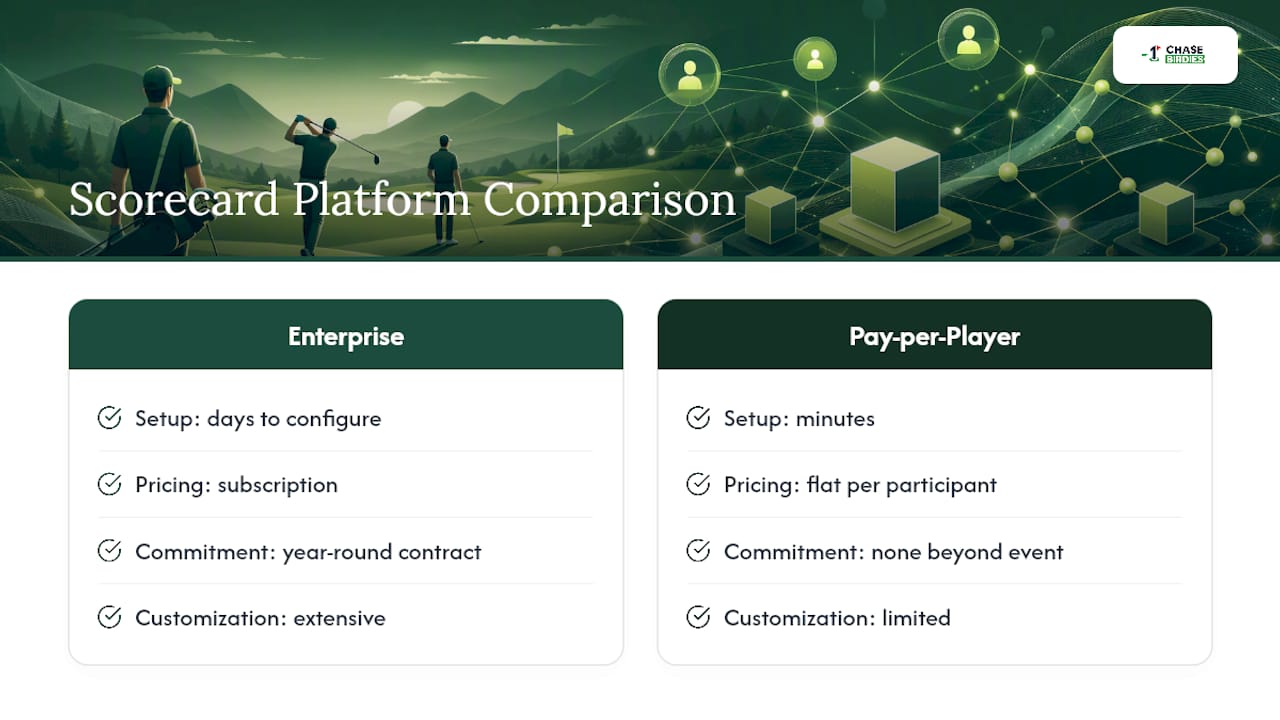
The right choice depends entirely on frequency and budget. An organization running one fundraiser tournament a year has no reason to pay for a year-round subscription built for a facility running events weekly. Platforms that centralize registration, payments, and live scoring on one system cut down on the administrative back-and-forth regardless of which pricing tier you land in, so that's worth prioritizing over brand name recognition.
Offline Capabilities and Data Syncing on the Course
Golf courses are notorious for spotty cell coverage, especially in wooded areas or valleys between holes. A platform that only works with a strong signal will fail you exactly when you need it most, mid-round, with fifty groups on the course.
Look for a platform that lets a marker keep entering scores even when a device temporarily loses signal, then syncs those entries to the leaderboard automatically once connectivity returns. This matters more on some courses than others, so it's worth walking the property or asking members about known dead zones before tournament day.
Where offline mode isn't available or reliable, the fallback is procedural, not technical: paper backup at every hole, collected and cross-checked against digital entries once the round finishes. This is the same one-two safety net covered in the tournament-day checklist above, and it's worth treating as standard practice regardless of how good a platform's offline claims sound on their pricing page. No signal, no sync, and no backup plan is how a great round turns into a leaderboard nobody trusts.
Customizing Scorecards for Different Event Types
A member-guest scramble, a corporate best ball outing, and a nonprofit fundraiser all need slightly different setups, even though they're all running on the same basic scoring engine. The formats themselves differ: a scramble has the whole team play from the best shot each time, while a shamble has players drive from the best spot but finish the hole individually. A scotch format adds its own alternating-shot wrinkle. Getting format selection right during setup avoids confusion once scores start coming in.
Beyond format, look for flexibility in leaderboard visibility. A corporate outing might want a PIN-protected leaderboard visible only to attendees, while a public charity fundraiser benefits from an open leaderboard that donors and sponsors can check from home. Sponsor branding options matter more for fundraisers, where hole sponsorships and leaderboard placements are part of the revenue model, and less for a private member event where no outside sponsor is involved.
Flight and division setup also varies by event type. A member-guest tournament often needs multiple flights by handicap, while a single corporate outing might run one flat leaderboard for everyone. The platform you choose should let you configure these details in minutes during setup rather than requiring a support ticket every time you run a different kind of event.
Analytics and Reporting After the Round
The scoring data collected during a live round is worth more after the tournament than during it, especially for fundraisers trying to prove impact to sponsors and donors. A good platform exports final standings, individual and team scores, and format-specific results to CSV or Excel without requiring you to retype anything.
Beyond raw scores, look for reporting that breaks down participation numbers, flight results, and any sponsor-related engagement data, like how many leaderboard views a sponsor's hole placement generated. Nonprofit golf fundraisers increasingly use this kind of export to feed donor CRM systems for post-event stewardship, turning a one-day tournament into a longer relationship with sponsors and donors who want to see where their money went.
For a club running the same event annually, historical reporting matters too. Being able to pull last year's scores and compare field size, average scores, or flight winners year over year helps with planning without digging through old spreadsheets. The best post-round reporting isn't just a data dump. It's organized enough that a volunteer treasurer or board member can open it and understand the event's results without needing you to explain the columns.
Organizer Perspective: 5 Tactical Takeaways
Most of what goes wrong with live scoring isn't technical. It's procedural. Here's what actually moves the needle.
Prioritize per-player pricing if you're running one or two events a year. Paying for a subscription built for daily use makes no sense for a single fundraiser. Run a 10-minute volunteer scoring rehearsal before tee-off, even if it feels unnecessary. It catches the confused-marker problem before it costs you time on the course. Treat your leaderboard as sponsor real estate and tell sponsors about that exposure before the event, not after. And keep one clear verification point, one person, one moment, before you lock in results and hand out awards. Skip that step and you're gambling on a phone screen instead of trusting your process.
— Jon
Chase Birdies: A Simple, Pay-Per-Player Way to Run Live Scoring
If your event runs once or twice a year, Chasebirdies is built for exactly that pattern instead of charging you for a subscription you'll barely use. Score entry happens hole by hole from any phone. Editable scorecards catch mistakes before they become disputes, and standings update instantly on a public or PIN-protected leaderboard without anyone touching a spreadsheet.

Every format your event might run is supported, from scramble and shamble to stroke play and match play, and setup takes minutes rather than a scheduled onboarding call. Pricing runs on a flat per-player basis with no hidden fees, which makes budgeting straightforward whether you're running a small club outing or a larger charity fundraiser. Clubs comparing scoring tools sometimes look at what other live-ranking platforms do for engagement in different sports, and the same principle applies here: real-time standings keep people checking in instead of waiting around.
Check the scoring features page to see hole-by-hole entry in action, then look at current pricing to plan your budget before your next event goes live.
Sources
- 6 High-Impact Upgrades for Your Next Golf Fundraiser | Nonprofit Tech for Good
- Live Scoring Setup for the Golf Genius Apps (Managers) | Tournament Management Help Center
- The Ultimate Golf Tournament Day Operations Guide - Tee To Toe